

How to Generate Meta Title and Meta Description with Aomark Suite
Where to Find It
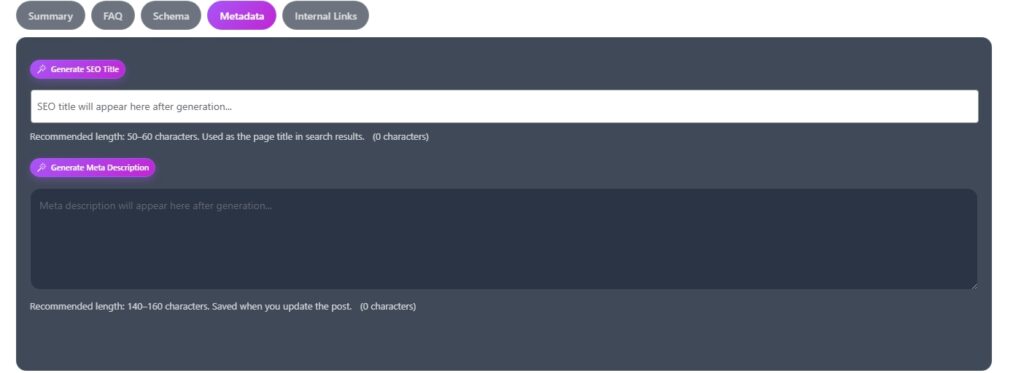
Open any post or page in your WordPress editor and scroll down to the Aomark Suite panel. Click the Metadata tab.
Generating the SEO Title
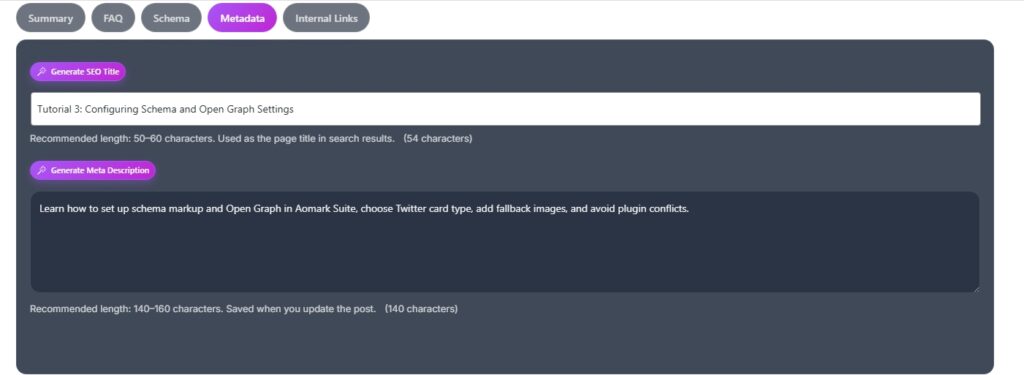
Click Generate SEO Title. Aomark reads your post content and generates an optimized title tag for search results. The recommended length is 50 to 60 characters and the counter below the field shows you exactly how many characters you’re at.
You can edit the generated title directly in the field. If you don’t like it, just click Generate SEO Title again to get a new one.
Generating the Meta Description
Click Generate Meta Description. Aomark generates a concise description based on your content. The recommended length is 140 to 160 characters and again the counter keeps you in range.
Both fields save automatically when you update your post. No separate save step needed.
Why These Matter
Your SEO title and meta description are what users see in Google search results before clicking. A well written title and description directly affects your click through rate, so it’s worth reviewing what Aomark generates rather than just applying it blindly. Treat the AI output as a strong first draft and refine it if needed.
Auto-Generated Metadata
If auto-generate on publish is enabled in Plugin Settings, Aomark creates both the title and meta description automatically when you publish, as long as those fields are empty. The manual tab is there for regenerating or editing at any time.
Next Steps
Metadata covered. Next up is the Internal Links tab in the post editor, where Aomark suggests contextual links to other content on your site.