




Meta descriptions sit in an odd spot in SEO. They’re not a direct lever like internal links or page speed. But they can still change what happens after you rank. So, does meta description affect seo the way people usually mean it? Not exactly. It rarely moves you up the results on its own. Yet it can influence clicks, satisfaction, and even the way Google rewrites your snippet.
In this post, you’ll get a clear, practical answer. You’ll also learn when changing a meta description matters, when it’s wasted effort, and how to write one that earns clicks.
Best for: Pages already getting impressions where a better snippet could win more clicks from the same rankings.
Not ideal when: You’re expecting the description to fix weak content, poor intent match, or thin topical coverage.
Good first step if: You see low click-through rate in Search Console on queries you actually want.
Call a pro if: Snippets look irrelevant across many pages, and you suspect indexing, canonicals, or templates are broken.
Quick Summary
- Meta descriptions usually don’t directly improve rankings, but they can change outcomes from existing rankings.
- A stronger description can lift click-through rate by matching intent and setting expectations.
- Google often rewrites descriptions when your tag doesn’t match the query or the on-page content.
- Blank descriptions don’t break SEO, but you lose control over messaging and consistency.
- WordPress makes descriptions easy to manage, but templates can cause duplication fast.
What is a Meta Description
A meta description is the short snippet you suggest search engines show under your title in results. It sits in your page’s HTML and summarizes the page for a searcher. It is not your on-page intro and not your SEO title tag.

Treat it like organic ad copy: aim for the right click, not every click, so clarity beats cleverness. Example: a category page for “women’s trail running shoes” can mention terrain, sizing, and shipping or returns to set expectations and reduce bounces from road-shoe shoppers.
Meta descriptions can also appear in social previews or browsers, but Google’s search snippet is the main use.
Your tag is a suggestion, not a guarantee. Google may rewrite it per query or pull a sentence from the page, so align your wording with on-page copy.
For a drafting workflow, use templates and tooling, then edit for intent and accuracy. generate titles and descriptions.
Does Meta Description Affect Google Rankings
Meta descriptions don’t usually affect rankings directly, but they can affect signals around your rankings. That’s the honest answer to “does meta description affect ranking.” Google has said descriptions aren’t a direct ranking factor. In practice, the tag itself rarely moves a URL from position eight to position three.
So what does this mean in practice? You shouldn’t treat meta descriptions like keyword fields. Stuffing them won’t help. And rewriting hundreds of descriptions won’t rescue weak pages.
But descriptions can matter indirectly. A better snippet can earn more clicks. More clicks can expose you to more users. And that can lead to more brand searches, more links, and more engagement. Those downstream effects can matter over time. They’re not guaranteed, though.
For example, a “how to reset a router” guide might rank in position five. If the snippet clearly lists the exact router models covered, it may win the click. That can lead to more shares in IT forums. The ranking didn’t change because of the tag. The page improved outcomes because of the snippet.
Here’s a quick way to think about meta description SEO importance. It’s rarely about “ranking juice.” It’s about winning the click that your ranking already earned.
| Meta description approach | Direct ranking impact | Best use | Common risk |
|---|---|---|---|
| Keyword-stuffed | None | None, avoid it | Looks spammy, gets rewritten |
| Intent-matched summary | None | Higher relevance and clicks | Can be too generic |
| Query-specific phrasing | None | Better snippet for long-tail | Hard to scale |
Also, Google rewrites a lot of snippets. That can make changes feel pointless. But you can often reduce rewrites. You do it by matching the description to what the page actually answers. And you keep it flexible for multiple queries.
If you’re testing “does changing meta description affect seo,” measure the right thing. Look at click-through rate and query alignment. Don’t expect a ranking jump next week.
Does Meta Description Affect Click-Through Rate
Meta descriptions can affect click-through rate because they shape relevance before the click. Your title grabs attention, and the description earns trust by answering, “Is this what I need?”
CTR is where meta description work can pay back fast. A single line change can shift clicks within days, especially on pages with steady impressions.
Example: for “email deliverability checklist,” “Learn email deliverability” is vague. “Check SPF, DKIM, DMARC, and list hygiene in one checklist” signals specificity, filters the wrong intent, and attracts the right click.
A good description supports CTR by:
- Confirming intent in the user’s language
- Adding one or two concrete details
- Setting format expectations (checklist, tutorial, template)
- Reducing friction (no login, works on iPhone)
CTR also depends on title, rich results, favicon, and brand familiarity, but the description is one of the few elements you control.
Validate in Google Search Console. Change one variable, keep date ranges comparable, and watch CTR on stable rankings for two weeks.
What Happens if You Leave Meta Description Blank
If you leave the meta description blank, Google usually generates a snippet from on-page content. That is not a penalty. Sometimes Google’s snippet is better than yours, but sometimes it becomes messy and lowers clicks.
The main downside is losing control. Without a description, you can’t consistently message key pages, match tone, or pre-qualify visitors. Example: a “returns policy” page might rank for “return window,” but Google may pull an unrelated line about shipping delays, creating confusion and bounces.
Scaling can make it worse. WordPress themes and plugins may auto-generate descriptions from the first sentence, which often reads awkwardly and repeats across pages.
Leaving it blank can be acceptable for thin utility pages, or when Google consistently rewrites your tag anyway. In those cases, improve the on-page passage Google prefers to pull.
If you’re unsure your site outputs descriptions correctly, spot-check pages: one tag per page, no duplication, and clean canonical signals, and confirm your meta description is present and unique on key pages.
How to Write a Meta Description That Gets Clicks
A click-worthy meta description is specific, aligned with intent, and honest about what the page delivers. Write for humans first, then let search engines interpret it.
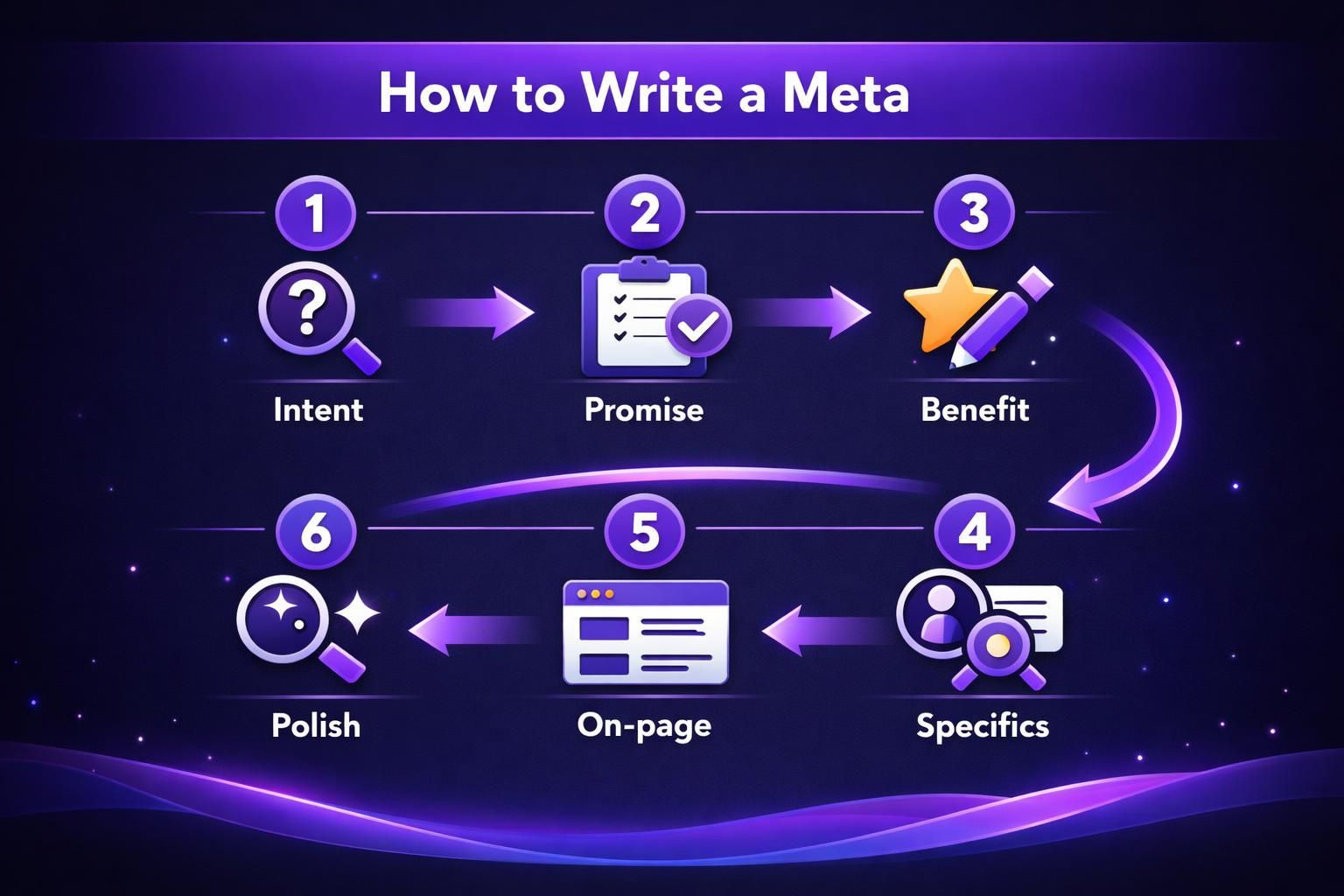
Start with the searcher’s goal. Say how the page helps in plain language, without hype. Example: for “best meeting agenda template,” try, “Copy a 30-minute agenda template with time boxes, roles, and follow-up notes.” It promises an exact deliverable and sets expectations.
Repeatable process:
- Choose one primary query theme
- Note two concrete inclusions competitors don’t state
- Turn them into a simple promise
- Add a qualifier (for beginners, for teams, no signup)
- Cut fluff and awkward phrasing
Avoid common traps: generic descriptions, repeating the title, and stuffing keywords until it reads robotic. If it sounds unnatural, it won’t earn clicks.
Trust boosters you can test:
- Real numbers visible on-page
- Clear formats like “template,” “checklist,” or “calculator”
- Constraints that pre-qualify readers
- Freshness cues only if you maintain the page
Match the page to the promise. If you claim “step-by-step,” show numbered steps early to reduce pogo-sticking.
Meta Description Best Practices for WordPress
WordPress meta descriptions work best when you mix templates with page-level edits for priority URLs. Most SEO plugins let you set a global pattern and override it per post, which keeps the workload realistic.
A practical approach is templating posts as “Learn how to {topic} with steps, examples, and mistakes to avoid,” then editing only pages with high impressions. This keeps the long tail covered without hand-writing every tag.
The biggest WordPress risk is duplication. Category, tag, author, and paginated archives can inherit the same text, which makes snippets look identical and pushes Google to rewrite more often.
WordPress-specific checks:
- Ensure every indexable template outputs a description
- Don’t reuse the same site tagline everywhere
- Write unique category descriptions if categories are indexed
- Watch pagination pages that inherit the same tag
- Confirm plugin updates aren’t stripping descriptions
Theme excerpts are separate. Many themes use excerpts in feeds and previews, but your excerpt is not your meta description. Write each for its job.
Conclusion
So, does meta description affect seo? Not as a direct ranking lever in most cases. But it can still change results in a very real way. A good description can raise click-through rate and attract better-fit visitors. It can also reduce snippet rewrites by matching on-page wording. If you’re going to spend time on meta descriptions, start with pages that already earn impressions. Then write specific, honest copy that matches search intent.