




If you’re deciding between a 301 and 302, you’re really deciding how search engines should interpret your intent. The core question behind 301 vs 302 redirect seo is simple. Is this move permanent, or is it a temporary detour? Get that wrong, and you can slow indexing, confuse canonicalization, or leave ranking signals split longer than necessary. Get it right, and Google can consolidate signals cleanly and keep users on-track. In this post, you’ll learn the plain-English difference, how each redirect influences indexing and link equity, and the best-fit scenarios for each. You’ll also see the common redirect mistakes that quietly hurt SEO, plus a practical audit checklist.
Best for: SEO teams choosing the right redirect type during migrations, cleanups, tests, and short-term content or inventory changes.
Not ideal when: You can’t control server rules or CMS-level redirects, or you have unclear intent about whether the change is permanent.
Good first step if: You’re unsure which you used, run a status code checker and map each source URL to one destination URL.
Call a pro if: You see chains, loops, or widespread indexing drops after a migration, and log files show heavy crawl waste.
Quick Summary
- A 301 redirect signals a permanent move, so Google should consolidate signals to the destination URL.
- A 302 redirect signals a temporary move, so Google may keep the source URL as canonical longer.
- Redirects influence indexing, canonical URL selection, and how link equity and PageRank consolidate over time.
- Chains and loops waste crawl budget and can delay recrawling and reindexing.
- The best redirect target is the most relevant equivalent page, not the closest “category” catch-all.
301 vs 302 Redirects: the Difference in Plain English
A 301 is a permanent redirect, while a 302 is a temporary redirect. Both are HTTP response status codes in the 3xx status codes family. They tell crawlers and browsers what to do next. A server returns a status code plus a Location header. That header points from the source URL to the destination URL.
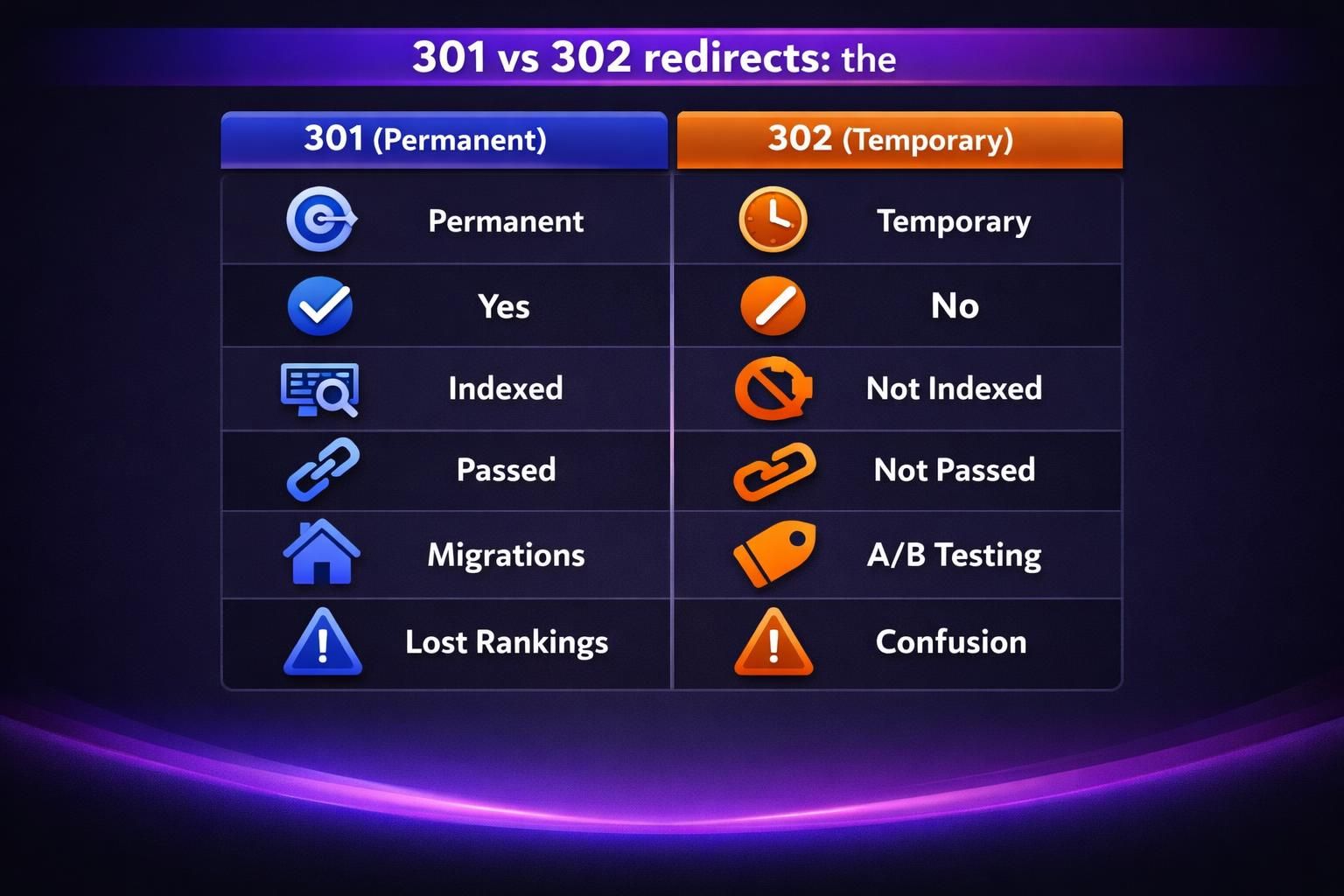
Here’s the practical meaning. A 301 says, “This URL has moved for good.” Google should shift canonicalization and signals to the new URL. A 302 says, “This is a detour.” Google may keep the original URL as the canonical URL. It may also keep the old URL indexed longer.
For example, you change /services to /solutions as a final URL restructuring. You’d use a 301 redirect from the old page to the new page. For example, you’re running maintenance mode for one weekend. You might 302 redirect /checkout to a status page.
Now, don’t confuse “temporary” with “bad.” A 302 redirect isn’t an error. It’s an intent signal. The real risk comes from using the wrong intent for too long.
| Option | Intended meaning | Canonical tendency | Typical SEO outcome |
|---|---|---|---|
| 301 | permanent move | destination becomes canonical | signals consolidate to new URL |
| 302 | temporary move | source stays canonical longer | signals may consolidate later |
How 301 and 302 Affect SEO (Indexing, Canonical, and Link Equity)
301 and 302 influence SEO by steering indexing, canonical selection, and signal consolidation. Google treats redirects as strong hints, but still weighs other signals like internal links, sitemaps, and content similarity.
A 301 typically pushes Google to adopt the destination URL as canonical faster, helping equity consolidate sooner. A 302 more often signals a temporary alternate, so the source URL may stay indexed and keep signals longer.
If you change a slug, pair the redirect with updated internal links and an updated XML sitemap to reduce ambiguity. For scalable cleanup and mapping, use bulk tools workflow.
Will Rankings Transfer With a 301 vs 302?
A 301 typically consolidates ranking signals more reliably because it signals a permanent move. Consolidation takes time as Google recrawls links, and you may see short-term volatility. The destination must still match intent and content. A 302 can pass signals, but outcomes vary: if Google views the move as permanent, it may treat it like a 301; if temporary, signals may stay with the source. Long 302s can complicate later reversals.
What Gets Indexed: Old URL, New URL, or Both?
With a 301, the destination URL usually becomes the indexed version over time, while the source may remain discovered and recrawled but stops showing as the primary result once consolidation completes. With a 302, Google may keep the source URL indexed and treat the destination as secondary, even if it is crawled and sometimes indexed. Example: 302 /pricing to /pricing-spring-sale for a promo, and /pricing may remain the shown result.
When to Use a 301 Redirect (Best-fit Scenarios)
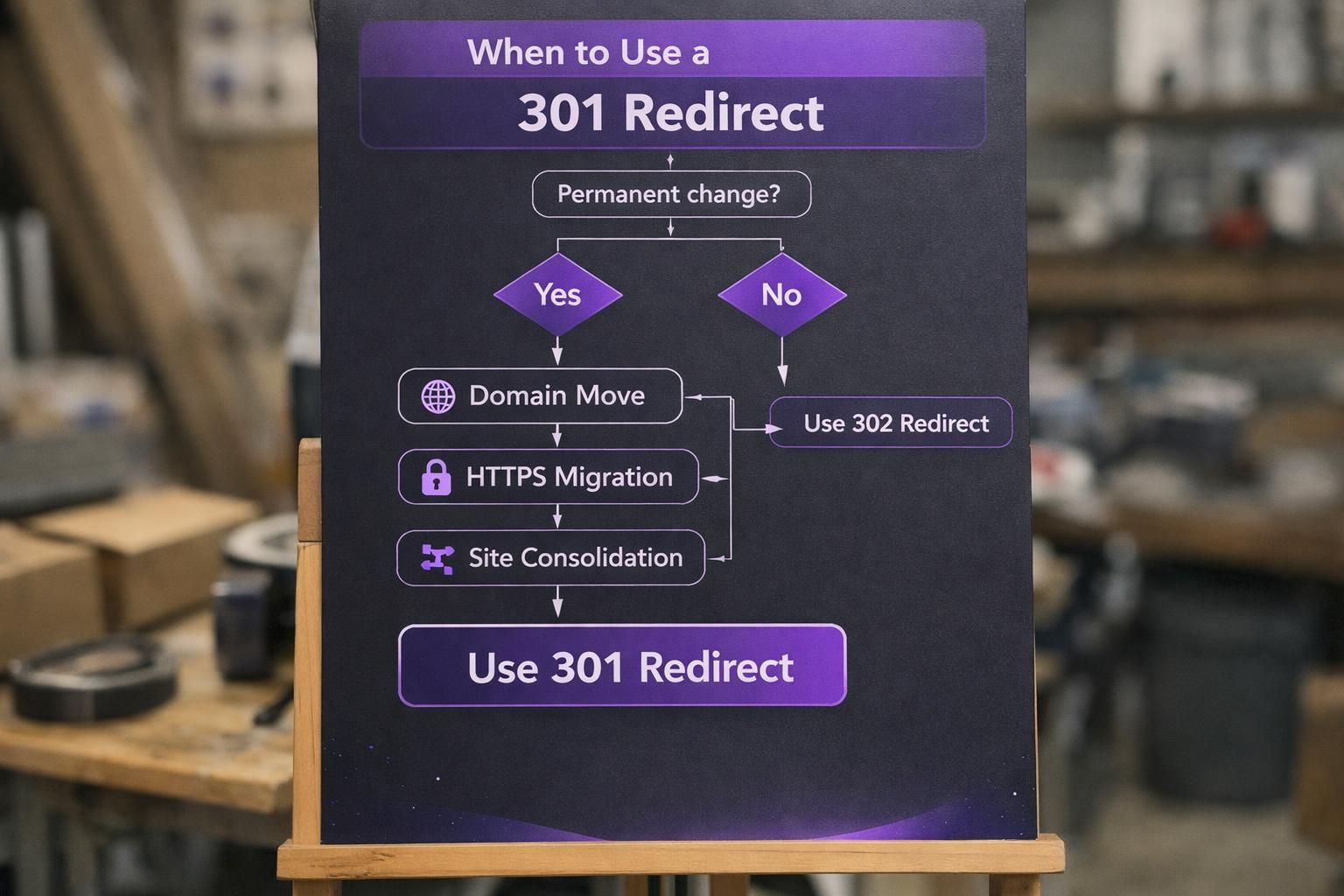
Use a 301 redirect when the old URL should not return, such as domain changes, HTTPS moves, or permanent URL restructuring. The goal is to consolidate SEO signals and send users to the right page consistently. 301s also fit content consolidation: merge duplicates, prune thin pages, and retire expired pages, but only to closely relevant targets. Avoid mass-redirecting to the homepage, which can create soft 404s. Keep one hop, and update internal links. Topic hub cleanups can help, like topic cluster setup.
Site Migrations, HTTPS, and URL Changes
Use 301 redirects for permanent URL changes during migrations, including HTTPS moves, domain changes, and new slug structures. A 301 tells crawlers the move is final and helps consolidate signals efficiently.
Map every indexable old URL to its closest equivalent new URL, preserving query strings when they matter. Avoid dumping everything onto the homepage, which weakens relevance.
Consolidating Duplicate Pages and Expired Content
Content consolidation should use 301 redirects when you’re permanently removing duplicates. This reduces duplicate content signals and clarifies the canonical URL. It also keeps external links from dying.
For example, you have /blue-widgets and /widgets-blue that target the same query. You pick one canonical page. You 301 the other page into it. Then you rewrite internal anchors to point directly to the canonical.
Expired content also fits, but only when there’s a true replacement. For example, an old webinar page can 301 to an updated on-demand version. But an expired coupon page shouldn’t 301 to a generic category if intent changes. That’s how you create soft 404 destinations.
When to Use a 302 Redirect (Best-fit Scenarios)
Use a 302 redirect when the source URL is expected to return and should remain the primary version. It’s common for A/B tests, maintenance windows, and short-lived campaigns where you want a temporary routing change without committing to a permanent move.
Good hygiene matters. Document why the 302 exists and set a review date, because “temporary forever” creates long-term uncertainty. For example, while rebuilding a category layout, you can 302 to a temporary template, then remove the redirect when the original URL is ready again.
Prefer server-side 302s over JavaScript redirects, since they’re clearer to crawlers, faster to process, and more consistent across devices.
A/B Testing, Maintenance, and Short-term Promos
Use a 302 for temporary routing like A/B tests, maintenance, or short promos. Keep the source URL as the stable entry point for analytics and indexing stability. Example: keep /signup as the main URL and 302 some users to /signup-variant-b, then end the test before variants become duplicates. For maintenance, 302 /checkout to /maintenance for a few hours to avoid broken sessions without signaling permanence. For promos, 302 /black-friday to /black-friday-2026, then retire it.
Localization and Temporary Stock/availability Changes
Localization can justify a 302 when routing depends on region or language, but you still want a stable canonical URL in some contexts. For example, a global /support page can 302 EU visitors to /support-eu while US visitors remain on /support, keeping the source as the consistent link in docs.
Temporary stock issues may also use a 302. If a product is out for a week, you might 302 to a “notify me” version of the same page, or to a very close substitute that matches intent.
If an item is discontinued, it’s not temporary, so use a 301 or another status approach.
Redirect Pitfalls That Hurt SEO (and How to Avoid Them)
Redirect problems waste crawl budget, weaken canonical signals, and add latency. The biggest issues are chains, loops, and irrelevant targets, which often cause slow consolidation. Prevent this by keeping one hop, redirecting each source only once, and choosing the closest relevant destination. Update internal links so crawlers hit final URLs directly, and monitor redirects during releases. Watch for stacked layers (CMS auto-redirects plus CDN rules) creating extra hops. Fix via internal link health scan.
Redirect Chains, Loops, and “Soft 404” Destinations
Redirect chains occur when A redirects to B, then B redirects to C. Loops send crawlers in circles. Both waste crawl resources, add latency, and complicate signal consolidation.
Fix chains by redirecting the original URL directly to the final destination and updating internal links. Example: redirect /blog/post straight to /post/ instead of /blog/post → /post → /post/.
Soft 404 destinations happen when the target is thin or irrelevant, so Google treats it as a poor replacement. Redirecting a deleted service page to the homepage often triggers this. Redirect to the closest equivalent content, or don’t redirect at all.
Redirecting to Irrelevant Pages or Leaving “Temporary” Redirects Forever
Irrelevant redirects break intent and can cause ranking losses because Google evaluates content similarity and user behavior. If you redirect discontinued products to /sale, many users looking for manuals or warranties will bounce. A better option is redirecting each item to its successor or a model-specific support page.
Leaving 302s in place indefinitely is another common problem after tests or redesigns. It creates months of uncertainty even if Google eventually figures it out.
Set a rule: every 302 needs an owner and a removal date. If the change becomes permanent, switch the redirect to a 301.
How to Audit Redirects and Validate the Setup
A redirect audit should verify three things: the correct status code, the correct final URL, and an efficient path with no extra hops. Start with a list of priority URLs: top traffic pages, highly linked pages, and key conversion paths. Test each with a status or redirect checker.
Confirm the destination returns 200, is indexable, and has sensible robots, meta robots, and canonical tags. A redirect into a noindex page or a page that canonicalizes elsewhere can stall consolidation.
Then fix internal links that still point to old URLs, because they waste crawl budget and keep redirects in the crawl path. Maintain a redirect map with source, destination, code, and owner.
What to Check in Google Search Console and Log/crawl Tools
Google Search Console helps confirm whether Google is following your redirect intent. Check indexing status and the selected canonical, and watch whether pages move out of “Duplicate” states into stable indexing.
If a destination URL won’t stick, use URL Inspection. Seeing “Alternate page with proper canonical” pointing to the old URL is a sign other signals still favor the source.
Logs and crawl tools show real bot behavior at scale, including chains, loops, and repeated hits on retired URLs. Connect Search Console early to speed validation, using connect Search Console.
Conclusion
Choosing between a 301 and 302 comes down to intent and follow-through. If the move is permanent, use a 301 and update internal links and sitemaps. If it’s temporary, use a 302 and set a cleanup date. Keep redirect targets tightly relevant, and avoid chains and loops. When you treat redirects like part of information architecture, SEO outcomes get more predictable. And when you audit regularly, you catch the quiet issues before they snowball. If you remember one thing about 301 vs 302 redirect seo, it’s this. Match the status code to reality, then make the final URL easy for Google to choose and crawl.