




If you’ve ever wondered why some pages get found fast and others sit invisible, sitemaps are often part of it. This guide breaks down the types of sitemap in SEO, with a practical focus on how each one helps crawling, indexing, and site discovery. You’ll see the real difference between an XML sitemap and an HTML sitemap. And you’ll learn when specialized sitemaps like image, video, or Google News are worth the effort. We’ll also cover sitemap index files for large sites, plus sitemap SEO best practices that prevent common errors. By the end, you’ll know what to publish, what to avoid, and how to submit everything cleanly.
Best for: Sites with many pages, frequent updates, or weak internal linking that need better crawling and indexing signals.
Not ideal when: Your URLs change constantly, you can’t control canonicals, or you’re listing many noindex and redirected pages.
Good first step if: You want a clean XML sitemap that matches your canonical URLs and reflects what you actually want indexed.
Call a pro if: You see sudden deindexing, persistent sitemap errors, or Search Console flags that you can’t resolve safely.
Quick Summary
- XML sitemaps help search engine crawlers discover and prioritize URLs you want indexed.
- HTML sitemaps help users and strengthen internal linking, especially on large or messy sites.
- Specialized XML sitemaps add metadata for images, videos, news, and sometimes international targeting via hreflang.
- Sitemap index files let you manage multiple sitemaps when you hit URL or file size limits.
- Good sitemaps list canonical, indexable URLs and avoid redirects, duplicates, and parameter junk.
What a Sitemap is (and How it Helps SEO)
A sitemap is a structured list of URLs that tells search engines what pages exist and how they relate. In SEO terms, it’s a discovery and crawling aid, not a ranking shortcut. An XML sitemap is an XML file built for a search engine crawler. It usually follows the sitemap protocol and uses tags like <urlset>, <url>, <loc>, and sometimes <lastmod>. An HTML sitemap is a normal HTML page that users can browse.
So what does this mean in practice? A sitemap reduces guesswork for indexing. It helps when your internal links are thin, your site is large, or new pages need faster discovery.
For example, a new category page on an ecommerce site might be buried behind filters. An XML sitemap can surface that URL early. And an HTML sitemap can give users a clean path to it.
When You Do (and Don’t) Need a Sitemap
You need a sitemap when discovery is hard or change is frequent. Large sites, newsy blogs, and stores with many categories usually benefit. Sites with faceted navigation also benefit, if you control which URLs get listed.
You don’t need one for a tiny site with perfect internal links. But even then, it rarely hurts if it’s accurate.
For instance, a five page portfolio with a simple nav can index fine. But a 5,000 URL store without a sitemap often wastes crawl budget.
The Main Types of Sitemap in SEO: XML Vs. HTML
The main sitemap choice is simple: XML is for search engines, and HTML is for people. XML sitemap SEO is mostly about giving crawlers a reliable URL inventory. HTML sitemap WordPress setups usually help with navigation and internal linking.
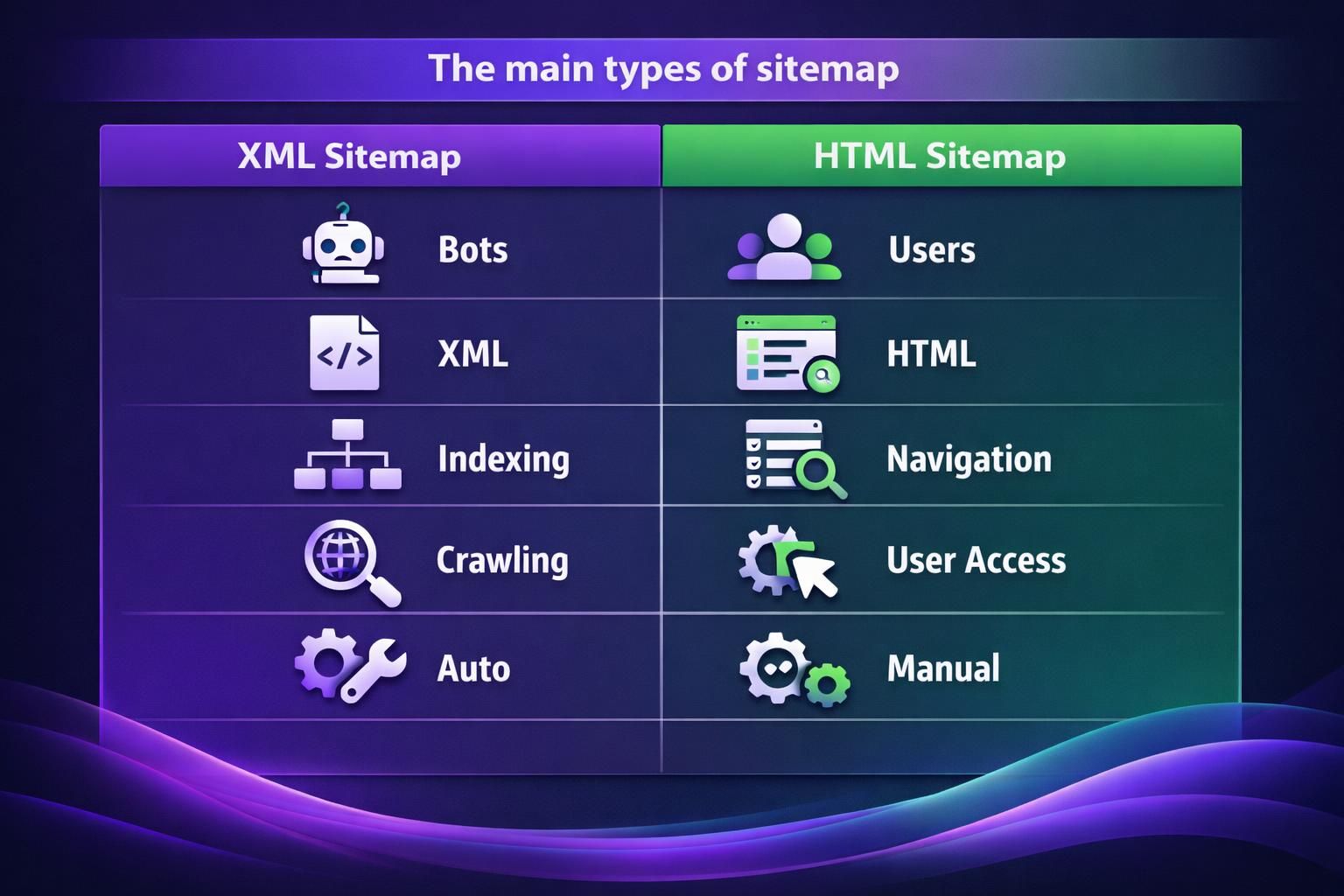
Here’s the key difference. An XML sitemap is a machine readable URL set with optional metadata. An HTML sitemap is a browsable page that passes internal link signals. The best sites often use both.
For example, a SaaS site might use XML to ensure feature pages get crawled. It might use an HTML sitemap to help users find older docs quickly. If you’re building internal linking intentionally, an HTML sitemap can support that. You can also pair it with topic cluster internal linking for more controlled link paths.
| Option | Primary audience | Best for | Limits | Typical outcome |
|---|---|---|---|---|
| XML sitemap | Search engines | Discovery and crawl coverage | Needs clean indexable URLs | More consistent crawling |
| HTML sitemap | Users | Navigation and internal linking | Can get long and messy | Better UX and link flow |
XML Sitemap (for Search Engines)
An XML sitemap is the standard way to tell Google and other engines which URLs matter. It’s not a guarantee of indexing. But it’s a strong hint for crawling and prioritization.
The basic structure is simple. Each <url> entry includes a <loc> URL. You can add <lastmod> when it’s trustworthy. Some generators also include <changefreq> and <priority>, but those are usually ignored.
For example, a blog that updates older posts can use <lastmod> to reflect real edits. But fake dates can backfire by creating noise.
HTML Sitemap (for Users & Internal Linking)
An HTML sitemap is a page on your site that lists important pages in a readable layout. It supports discoverability for humans and bots through internal links. That can matter when your navigation is deep or inconsistent.
Keep it curated. Link to key categories, hubs, and high value pages. Avoid dumping every tag and filter page.
For instance, a university site might list departments, admissions, and program pages. It shouldn’t list every PDF or search results page. If you’re auditing link flow, tools and processes like analyze internal link health can reveal gaps an HTML sitemap helps patch.
Specialized XML Sitemap Types (and When to Use Them)
Specialized XML sitemap types exist to provide extra metadata beyond basic URLs. You use them when Google needs more context for specific content types. These sitemaps still follow the same sitemap protocol concepts. But they add image metadata, video metadata, or news publication metadata.
Don’t add them just because you can. Add them when you publish that content at scale or when discovery is failing.
For example, a recipe site with hundreds of original photos might benefit from an image sitemap. A course platform with many landing pages and embedded videos might need a video sitemap. And a publisher in Google News might need a Google News sitemap.
Image, Video, and News Sitemaps
An image sitemap helps search engines understand images tied to a URL. It’s useful when images are loaded through scripts or galleries. It can also help when image URLs aren’t easily crawled.
A video sitemap is useful when video discovery is weak. It can declare video pages and include key video metadata.
A Google News sitemap is for eligible publishers. It focuses on recent articles and news specific metadata.
For example, if you host product demos behind a JavaScript player, Google may miss them. A video sitemap can surface those pages. If you also manage image SEO details, pairing this with Google image SEO priorities keeps your signals consistent.
RSS/Atom Feeds, Text Sitemaps, and Hreflang Via Sitemaps
RSS feed, mRSS, and Atom 1.0 feeds can complement sitemaps for fresh content discovery. They aren’t a full replacement for a proper XML sitemap. But they can help search engines notice new posts quickly.
A text sitemap is a plain text URL list. It’s useful for quick troubleshooting or very simple systems. It’s also handy when you need a minimal format for a legacy stack.
Hreflang can also be implemented via sitemaps for multilingual sitemap needs. That’s helpful when HTML hreflang tags are hard to maintain.
For instance, a multinational targeting setup with 20 country pages can centralize hreflang in sitemaps. That reduces template risk. But you still need clean canonicals per locale.

Sitemap Index Files (for Large Sites)
A sitemap index file is the right solution when one sitemap can’t hold everything. It’s a file that lists multiple sitemap files. Each entry points to a sitemap URL, often with its own <lastmod>.
This matters because sitemaps have URL limits and file size limits. The common standard is 50,000 URLs per sitemap. Large ecommerce sites hit that fast. So do marketplaces and real estate portals.
For example, a store might split by category, like /sitemap-products-1.xml and /sitemap-categories.xml. The sitemap index then becomes the single submission point in Google Search Console. That keeps management simpler.
Size Limits and Splitting Sitemaps
You should split sitemaps by logical groups that match your site architecture. That makes debugging easier. It also helps you spot which section has indexing problems.
Common split patterns include:
- Content type, like posts, pages, products, and categories
- Update frequency, like evergreen vs frequently updated
- Language or country folders for international sites
- Media sitemaps separated from core URL sitemaps
For instance, if only product pages are dropping out of the index, a product sitemap makes it obvious. If you mix everything together, you lose that visibility.
Best Practices for Sitemap SEO
Good sitemaps list what you want indexed, and only what you want indexed. That sounds obvious. But most sitemap errors come from sloppy URL hygiene. Your sitemap should align with your canonicals, robots directives, and actual site structure.
Start with quality control. Include only 200 status URLs that return a clean canonical. Exclude redirected URLs, 404s, and pages blocked by robots.txt. Also exclude noindex pages, unless you’re intentionally diagnosing a problem.
For example, a WordPress site often includes tag archives by default. If those tags are thin and noindexed, they shouldn’t be in your sitemap. If you’re using a plugin workflow, a focused setup guide like sitemap configuration steps can help you match output to intent.
What to Include/exclude + Canonical URLs + Lastmod Guidance
Include canonical URLs that you’d be happy to see as landing pages from Google. Exclude parameter URLs, session IDs, and internal search results. And watch for trailing slash duplicates.
<lastmod> should reflect meaningful content updates, not tiny template changes. If your CMS updates dates on every edit, that can create noise.
For instance, changing a sidebar widget sitewide shouldn’t update <lastmod> across 10,000 URLs. But updating pricing details on a product page should.
How to Create and Submit Your Sitemap
You can create a sitemap with a CMS sitemap generator, a plugin, a script, or a dedicated sitemap generator tool. The right method depends on how dynamic your URLs are and how much control you need. Whatever you choose, validate the output and make sure it matches real canonical URLs.
Start by finding the current sitemap URL. Common locations include /sitemap.xml or /sitemap_index.xml. WordPress plugins often publish it automatically. Custom stacks might generate it during deployment.
For example, if you migrated from http to https, a sitemap can accidentally keep old URLs. That creates redirect entries and wastes crawl time. Fixing the generation source is better than patching the symptoms.
CMS/plugins Vs. Custom Generation
CMS plugins are usually fine for standard sites. They’re quick and they update automatically as you publish. The downside is limited control over edge cases like faceted navigation. Custom generation is better when you need strict rules.
Use a plugin when:
- Your URL structure is stable
- You mainly publish posts, pages, and products
- You can control indexation settings inside the CMS
Use custom generation when:
- You have millions of URLs or heavy filtering
- Canonical logic depends on business rules
- You need strict splits for sitemap index management
For instance, a WooCommerce store with filters may need custom logic. You don’t want every color and size URL in the sitemap.
Submitting Via Search Console and Robots.txt
Submit your sitemap in Google Search Console for clear feedback and error reporting. Search Console will show sitemap status, discovered URLs, and common sitemap errors. It also helps you see whether URLs are indexed or excluded.
You can also list the sitemap location in robots.txt. That makes it easy for crawlers to find without manual discovery.
For example, after a redesign, you can submit the new sitemap and watch for spikes in “Submitted URL blocked by robots.txt.” If that happens, it’s often a deployment rule or staging block left behind. If you haven’t connected your property yet, connect Search Console is a clean starting point.
Conclusion
Choosing the right types of sitemap in SEO comes down to purpose. Use an XML sitemap for crawler discovery and indexing coverage. Add an HTML sitemap when users need a clear map and your internal linking needs support. Bring in specialized sitemaps for images, video, news, or hreflang only when they match real content and real constraints. And keep everything clean with canonical URLs, accurate lastmod values, and sensible sitemap index splitting. Your practical next step is simple: open your sitemap, spot check a few URLs, then validate and submit it in Google Search Console.