




If you’ve ever asked what is on page seo and off page, you’re really asking a planning question. Where should you spend your limited time first? On-page SEO is everything you control on your site pages. Off-page SEO is the trust and signals you earn elsewhere. Both matter, but they solve different problems. On-page gets your content understood and usable. Off-page helps Google believe it’s worth ranking. In this post, you’ll learn how they differ, which factors actually move the needle, and how to decide what to prioritize. You’ll also get a practical WordPress checklist you can use right away.
Best for: Site owners who need clear priorities for building rankings with both content quality and external trust signals.
Not ideal when: You’re ignoring technical issues like indexing, canonicals, or crawl blocks that stop pages from showing up.
Good first step if: You can improve one page today by aligning intent, headings, and internal links to a single topic.
Call a pro if: Your site has a history of penalties, toxic link spikes, or rankings that drop after every update.
Quick Summary
- On-page SEO shapes relevance by improving content, structure, and page-level signals.
- Off-page SEO builds authority through links, mentions, and reputation signals from other sites.
- On-page is faster to fix and easier to measure per page.
- Off-page is slower but can raise the whole domain’s perceived trust.
- Start with on-page when pages don’t match intent, then layer off-page once the page deserves links.
What is On-Page SEO
On-page SEO is the work you do on your pages to help search engines understand, trust, and rank them for the right queries. Think of it as tightening the connection between a keyword’s intent and what your page actually delivers. It covers content, headings, internal links, media, metadata, and page layout choices that affect usability.

So what does this mean in practice? You’re shaping both meaning and experience. Meaning comes from topic coverage, terminology, and structure. Experience comes from readability, scannability, and the way you guide a visitor to the next step.
For example, you publish a “remote team onboarding” guide. The page ranks for “onboarding checklist” but converts poorly. On-page improvements might include a clearer checklist section, better H2s, and a tighter intro. You’d also add internal links to related policies and templates. If you need a clean way to build those connections, internal linking in WordPress helps you avoid common structure mistakes.
This is also where many “what is on page seo” conversations get stuck. People treat on-page as only keyword placement. But it’s really about intent fit, clarity, and page signals working together. Keywords still matter, but mostly as a way to confirm relevance. They aren’t the goal.
What is Off-Page SEO
Off-page SEO is the set of signals outside your site that suggest your pages deserve attention and trust. The biggest one is backlinks. But brand mentions, citations, and public reviews can also influence perceived authority. Off-page is less about what you say, and more about what others say about you.
You can’t fully control off-page SEO, and that’s the point. Search engines need external validation. A page can be perfectly written and still struggle. It might struggle because nobody in the niche references it. Or it might struggle because stronger sites have more links and mentions.
For example, you write a detailed comparison of project management tools. It’s accurate and well-structured. But it sits on page two for months. Then a respected industry newsletter links to it. That single mention can bring referral traffic and help the page compete. It won’t always be immediate, but it often changes the page’s “weight” in the topic.
Off-page SEO also includes relationship work. That can mean digital PR, partnerships, podcasts, and original research. But it also includes the basics. Are people even aware your content exists? If the answer is no, you may have an off-page problem, not a content problem.
On-Page vs Off-Page SEO: Key Differences
On-page SEO controls relevance, while off-page SEO reinforces authority and trust. They overlap, but they don’t substitute for each other. If your page is confusing, links won’t fix the mismatch. If your page is great but unknown, on-page alone might not be enough.
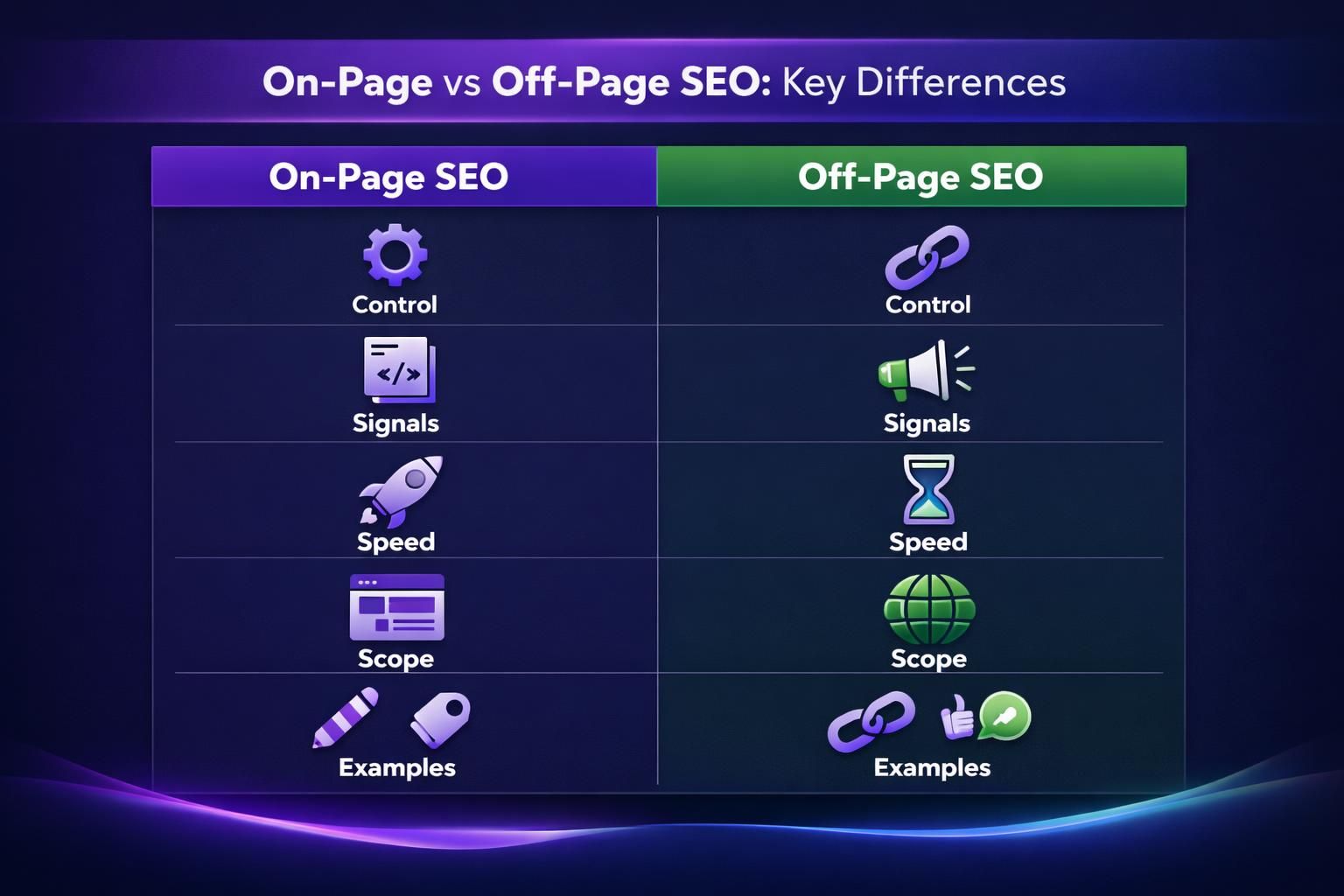
Here’s a simple way to think about it. On-page SEO helps a page qualify. Off-page SEO helps it win. And you usually need both to compete in results that have serious competition.
| On-Page vs Off-Page SEO comparison | On-Page SEO | Off-Page SEO | What it influences | Typical downside |
|---|---|---|---|---|
| Main lever | Content and page signals | External references | Relevance vs authority | Over-focus on one side |
| Speed of impact | Faster changes | Slower changes | Page-level rankings | Harder to attribute |
| Control | High | Medium to low | Consistency of signals | Risky shortcuts exist |
For example, a local accountant builds a service page for “tax prep for freelancers.” On-page work gets it indexed and relevant. But nearby firms have links from chambers of commerce and local news. Off-page signals help them rank higher. In that case, you’d do both. You’d tighten the service page first. Then you’d build local mentions and partnerships.
And this is where “on page seo vs off page seo” becomes practical. You’re not picking a team. You’re sequencing work based on what’s holding you back right now.
What On-Page SEO Factors Matter Most
The on-page factors that matter most are search intent alignment, content structure, internal links, and page-level metadata. If you nail those, you usually cover the biggest relevance signals. You also make the page easier to read and easier to crawl.
Start with intent. Look at the current top results and ask a blunt question. Are they guides, lists, tools, or product pages? Then match the format. But don’t copy. Improve clarity, depth, or usefulness.
For example, you target “content brief template.” The top results are downloadable templates with short instructions. If you publish a 4,000-word essay first, you’re fighting intent. A better on-page move is a clean template section, plus a short “how to use it” block.
Next, structure the page so it’s skimmable. Use one clear H1, then logical H2s, then H3s where needed. Keep paragraphs tight. Put key answers near the top. Add a table when comparison is central, but only when it helps a reader decide.
Internal linking is another big lever. It helps distribute authority and it helps Google understand topic clusters. Link from supporting posts to your main page. Link back where it’s natural. Avoid linking everything to everything.
For example, you have three posts on “meta descriptions,” “title tags,” and “content refresh.” Your “SEO basics” guide should link to each one. The anchor text should describe the destination. If you need to fix the snippet piece, add a meta description can help you implement it cleanly.
Now look at on-page SEO examples that are easy wins:
- Rewrite the title to match intent and promise a clear outcome.
- Add an FAQ block if the query has clear sub-questions.
- Improve intros that bury the answer.
- Add a “steps” section for task-focused queries.
- Compress and rename images, then write accurate alt text.
- Add 3 to 6 internal links to closely related pages.
Media is often overlooked. Images can support understanding, but they can also bloat pages. Use images that clarify the content. Give them descriptive names and alt text that matches the image. For example, a screenshot labeled “wordpress-permalink-settings.png” is better than “IMG1049.png.” If you’re unsure what to prioritize, [internallink:image SEO priorities | google-image-seo-best-practices-alt-text-file-names-what-to-prioritize] breaks down what usually matters.
Finally, don’t confuse on-page with technical SEO. Canonicals, sitemaps, and crawl management matter, but they’re not page writing. Still, they can block your on-page work from showing results. For example, a wrong canonical tag can send Google to a different page. If you’ve ever had a page “disappear,” check WordPress canonical URL setup to make sure the right page is the canonical.
What Off-Page SEO Factors Matter Most
The off-page factors that matter most are link quality, topical relevance, natural anchor patterns, and brand credibility signals. One strong, relevant link can beat many weak ones. And a link profile that looks organic tends to be safer long term.
Start with link relevance. A link from a site in your industry usually matters more than a random directory. Also consider page-level context. A link inside a relevant article often carries more meaning than a footer link.
For example, you run a payroll software blog. A backlink from a well-known HR consultant’s article about payroll mistakes fits perfectly. A link from a generic “business resources” page may do less. Same number of links, different impact.
Next is how you earn links. You don’t need gimmicks. You need assets people cite. Common link-worthy assets include:
- Original frameworks that simplify a confusing process
- Free templates that save time
- Side-by-side comparisons with clear decision criteria
- Curated lists with strong evaluation standards
- Small tools, calculators, or checklists
For example, a marketing agency publishes a “homepage teardown checklist” as a downloadable PDF. They then pitch it to newsletter writers and UX bloggers. The pitch is easy because it’s useful. That’s the core of sustainable off-page work.
Brand mentions also matter, even without a link. If people talk about your brand in the same context as the topic, it can reinforce credibility. Reviews and citations matter most in local SEO, but they can help in other niches too. Just keep it real. Fake reviews and spammy citations are easy to spot.
Anchor text is another nuance. Exact-match anchors from every site look unnatural. A mix is healthier. Expect branded anchors, URL anchors, and descriptive phrases. For example, “see this onboarding checklist” is fine. So is “BrandName guide.”
And yes, you can hurt yourself with off-page SEO. Low-quality link schemes still exist. They can create short spikes and long headaches. If someone offers hundreds of links quickly, assume it’s risky. You want links that make sense to humans.
Which Should You Prioritize First
You should prioritize on-page SEO first when your pages don’t satisfy intent or lack clear structure. Off-page SEO comes next when the page is already strong but lacks authority signals. This order saves time because you don’t want to earn links to a page that doesn’t deliver.
A simple decision check helps. Pull up the query and compare your page to the top results. If your page is thinner, less clear, or poorly structured, fix on-page first. If your page is genuinely better but still stuck, you may need off-page support.
For example, your “employee handbook template” page has weak formatting and no downloadable asset. Don’t pitch it for links yet. Add the template, add clear sections, and update the meta title. Then you can promote it. You’re giving people something worth referencing.
On the other hand, suppose you run a niche SaaS. You publish a deep integration guide. It’s better than what’s ranking. But you have few backlinks as a domain. In that case, start building relationships. Get listed in partner directories. Offer guest tutorials. Pitch your guide to integration roundups.
Now, don’t forget technical blockers. A page can be “perfect” and still fail if it’s not indexable. For example, a noindex tag or a broken sitemap can slow discovery. If you suspect that, run a technical check. You can use technical SEO audit checklist to catch common issues before you invest in promotion.
A practical workflow often looks like this:
- Fix one target page’s intent, structure, and internal links.
- Make sure it’s indexable and canonicalized correctly.
- Publish or update supporting pages to create a topic cluster.
- Promote the best asset to earn mentions and links.
- Review results, then repeat with the next page.
That loop keeps you from “doing everything” and finishing nothing. It also keeps your off-page work focused on pages that can convert.
On-Page SEO Checklist for WordPress
A solid WordPress on-page checklist covers titles, headings, URLs, internal links, images, schema basics, and indexability settings. WordPress makes publishing easy, but it also makes it easy to miss details. A checklist keeps your pages consistent across authors and updates.
For example, you update an older blog post and forget to change the meta description. Or you upload images with huge file sizes. Those are small misses that add up across dozens of pages.
Use this checklist when publishing or updating a page:
- Confirm the main keyword maps to one clear intent.
- Write a title tag that matches the query and page promise.
- Add one H1 that matches the page topic.
- Use H2s to outline the page before you write.
- Keep paragraphs short and front-load answers.
- Add internal links to related pages, and link back where relevant.
- Check the URL slug for clarity and consistency.
- Add a meta description that reflects the page, not just keywords.
- Optimize images with descriptive filenames and accurate alt text.
- Confirm the page is indexable and has the correct canonical.
- Add or refine FAQ or HowTo schema only when it fits the content.
- Update the publish date only when changes are meaningful.
If you want a longer version you can reuse across pages, on-page SEO checklist is a handy reference point. Keep your own version too. Your site has unique needs.
WordPress-specific pitfalls are worth calling out. Plugins can create duplicate pages through tags, archives, and parameter URLs. For example, you may have a “/category/seo/” archive ranking instead of your main guide. That can split signals and confuse visitors. Canonicals and internal linking usually fix it, but you need to spot it first.
Another common issue is broken internal links after slug changes. For example, you rename a post slug and forget old links in other articles. That hurts user experience and wastes crawl time. A quick scan using find broken links can prevent that slow leak.
And if you’re building new pages at scale, duplication happens. For example, you clone a service page layout and forget to change the title tag. If you’re using page duplication tools, double-check the SEO fields each time.
Conclusion
On-page SEO and off-page SEO work best as a sequence, not a debate. Get on-page right so your page matches intent and reads cleanly. Then earn off-page signals so the page has authority in the niche. If you came in asking what is on page seo and off page, the practical answer is this. Fix what you control first, then promote what deserves attention. Pick one page, run the checklist, and compare it to the top results. You’ll know quickly whether you need clearer content, better internal linking, or more external mentions.