




A technical SEO audit is basically your site’s health check for crawling, indexing, rendering, and performance. And it’s the fastest way to spot issues that quietly cap rankings. This technical seo audit checklist is built for real audits, not theory. You’ll learn what to pull first, what to check in Google Search Console, and how to turn messy crawl exports into a clean fix list. We’ll also cover modern basics like Core Web Vitals, mobile rendering, and structured data validation. So what does this mean in practice? You’ll finish with a repeatable workflow you can run quarterly, after migrations, or anytime traffic drops for “no obvious reason.”
Best for: SEO leads and site owners who need a repeatable technical audit workflow across content, ecommerce, or SaaS sites.
Not ideal when: You’re only chasing keyword gaps or content refreshes, and the site has no crawling or indexing symptoms.
Good first step if: You suspect indexation or performance problems and want to narrow causes before changing templates or plugins.
Call a pro if: You see sudden deindexing, widespread 5xx errors, migration fallout, or HTTPS and hostname inconsistencies across pages.
Quick Summary
- Start with baselines from Google Search Console, a fresh crawl, and a short log file sample.
- Separate crawlability problems from indexability problems, since they need different fixes.
- Treat URL duplication as a system issue, not a one page problem.
- Use internal linking and hierarchy to control what gets discovered and what gets prioritized.
- Diagnose Core Web Vitals by element and resource, not by generic “speed” advice.
- Validate structured data against the pages that actually rank, not just templates.
How to Use This Technical SEO Audit Checklist
Use this checklist as a prioritization tool, not a box ticking exercise. Your goal is to find the few issues that cause the most drag. That usually means problems that block crawling, break indexing signals, or waste crawl budget. A technical SEO audit should end with an action plan. It shouldn’t end with a spreadsheet nobody touches.
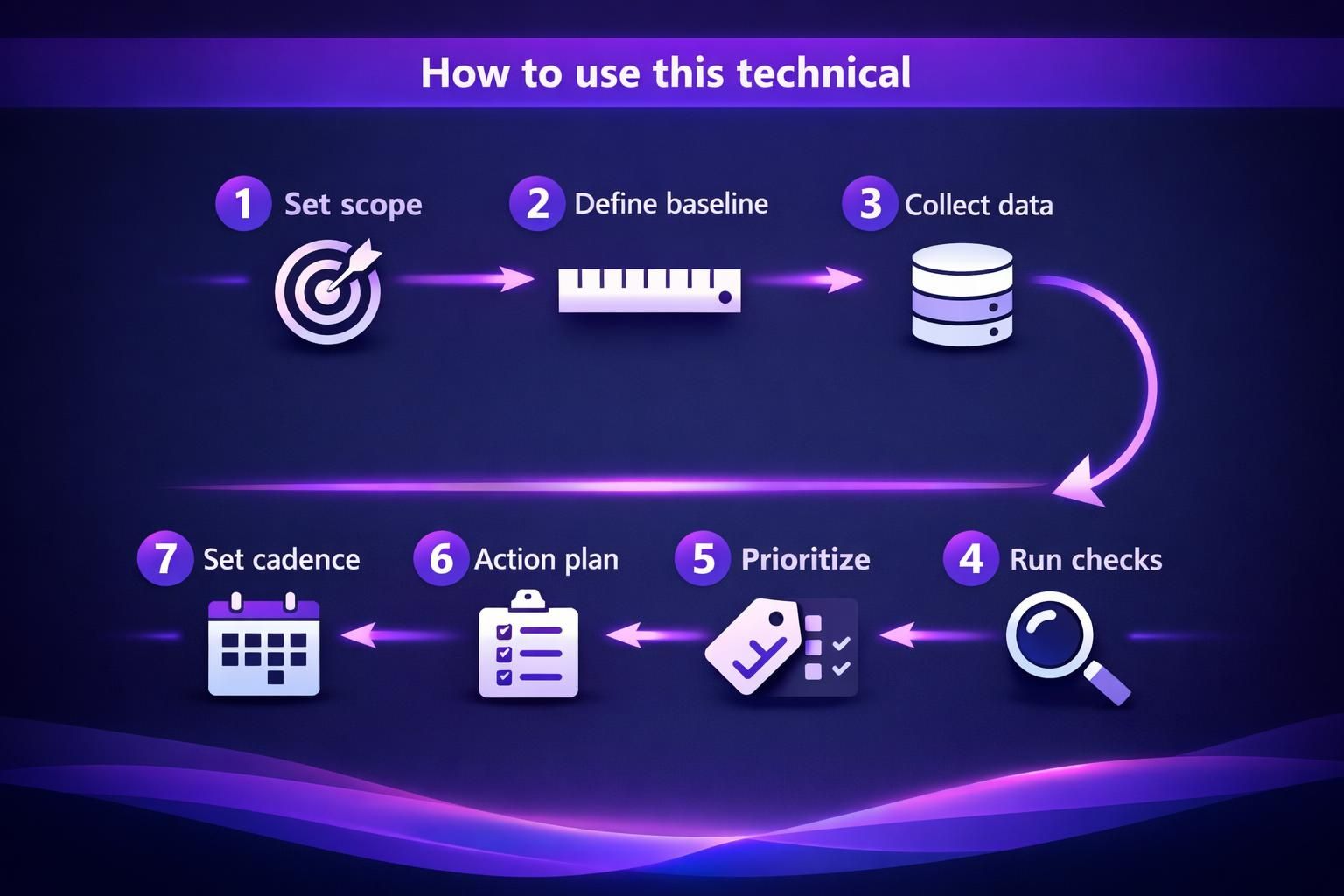
Start by setting scope and expectations. Decide if you’re auditing the whole domain, a subfolder, or a set of templates. Then define what “good” looks like for your site. For instance, an ecommerce site can tolerate many parameter URLs. A documentation site usually can’t.
Now build a simple triage system. Tag every finding by impact and effort. Keep it consistent so stakeholders trust it.
- High impact, low effort: fix first
- High impact, high effort: plan and schedule
- Low impact, low effort: bundle into hygiene
- Low impact, high effort: challenge or drop
For example, if category pages aren’t indexing, that’s high impact. If 12 old blog tags return 404s, that’s usually hygiene. And if JavaScript rendering breaks navigation links, that’s urgent.
This is also where your audit template matters. You’ll move faster if your outputs are standardized. Use the same columns every time. Include evidence, a recommended fix, and who owns it. If you’re auditing inside a platform, keep your workflow documented. For instance, you can centralize tasks and exports in your plugin setup steps.
Finally, set cadence based on change rate. A stable site can run a deeper audit quarterly. A fast shipping team needs lighter checks monthly. Always run an audit after migrations, redesigns, CMS changes, or CDN switches.
What to Collect Before You Start (GSC, Crawl, Logs)
Collect three things first: Google Search Console data, a crawl export, and at least a small log sample. That trio shows what Google sees, what links exist, and what bots actually hit. It also helps you avoid chasing ghosts.
From Google Search Console, pull the Index Coverage report context and key URL samples. Look at sitemaps, crawl stats, and manual actions. Export lists of excluded URLs when patterns look weird. For example, if “Crawled currently not indexed” spikes on one folder, that’s a clue.
From your website crawler, grab a fresh crawl with consistent settings. Sitebulb is a common choice for this. But any crawler works if it captures canonicals, directives, and status codes. For example, crawl both mobile and desktop user agents if your setup differs.
From server log files, take a recent slice. Even a few days can show waste. For instance, you might find Googlebot spending time on filtered URLs. That’s often a parameter control issue.
Crawlability & Indexability Checks
Crawlability and indexability problems are the most common reason “good pages” don’t rank. Crawlability is about access. Indexability is about eligibility and signals. You need both to be healthy.
Start with a crawl and categorize URLs by HTTP status codes. Break out 2xx, 3xx, 4xx, and 5xx. Then map them to templates and sections. For example, if all 5xx errors come from a faceted navigation pattern, you’ve found a system bug.
Next, compare what your crawler found to what Google reports. GSC might show indexed URLs you didn’t crawl. Or the crawl might reveal thousands of URLs Google ignores. That gap is where the audit gets useful.
Check directives at scale. Look for robots meta tag issues, noindex directive use, and accidental nofollow directive use on internal links. Confirm that canonical targets are indexable. Confirm that important pages return 200 status codes. And confirm they aren’t blocked by robots.txt.
For example, a blog might have /page/2/ pagination pages set to noindex. That can be fine. But if the main category pages are also noindex, you’ve killed discovery and ranking potential.
Also watch for “soft” indexability issues. Thin content can still be indexed, but it often won’t rank. That’s why you should pair technical checks with basic on page technical elements. Titles, meta description patterns, and heading tags matter in a technical seo page audit checklist. They’re often template driven, which makes them fixable.
Robots.txt, XML Sitemaps, and Crawl Error Triage
robots.txt should block what you truly don’t want crawled, not what you want hidden. Use it to reduce waste, not to fix duplication alone. For example, blocking /search can be smart. But blocking /category can be catastrophic if that’s where your rankings come from.
Audit your XML sitemap for accuracy and intent. It should include canonical, indexable 200 URLs. It should not include 3xx, 4xx, or noindex URLs. If you have a sitemap index, confirm it references the right sitemap files. For example, a CMS might keep publishing an old sitemap with staging URLs.
If you manage sitemaps in a tool, validate the configuration and output rules. For instance, check your sitemap configuration if you suspect sitemap omissions.
Then triage crawl errors by pattern. Don’t treat every 404 errors row equally. Group by referrer and template. Fix internal links first. Fix sitemap mistakes second. For example, a deleted product URL can 404 forever. But an internal nav link to it is a real problem.

URL Management (Canonicals, Parameters, and Redirects)
Good URL management makes your indexing signals consistent and your crawling efficient. Bad URL management creates duplicate content, dilutes internal links, and confuses canonicalization. The fix is usually a mix of rules and enforcement.
Start by listing all URL variants your site produces. Check trailing slashes, uppercase, www vs non www, and http vs HTTPS. Then check parameterized URLs from filtering, sorting, and tracking. For example, a Shopify style filter might produce dozens of URLs per category.
Next, review canonical tag patterns. Canonicals should point to the preferred version, and they should be self consistent. A canonical tag pointing to a redirected URL is a warning. A canonical pointing to a non indexable page is worse.
Redirect rules also need scrutiny. Use 301 redirect for permanent consolidations. Use 302 redirect only when the change is truly temporary. And keep redirects short. Chains waste crawl budget and slow users.
For example, if /old-post redirects to /blog/old-post and then to /blog/old-post/, that’s a chain. Consolidate it into one hop. Your crawl will show these patterns fast.
Parameter handling is where policy matters. Decide what should be indexed. Then enforce it with a mix of canonicals, internal linking, and sometimes noindex. Don’t rely on one signal. Google evaluates signals in aggregate.
Duplicate URLs, Canonicalization, and Redirect Chains
Duplicate URLs are usually a symptom of templates and tracking, not content theft. You’ll find them through clusters in your crawl export. Group by title tag, by canonical target, and by near identical content. For example, /product?color=red and /product?utm_source=email often resolve to the same page.
Look for canonicalization conflicts. Common ones include:
- Canonical tag points to A, but internal links point to B
- Canonical points to a URL that returns 404 errors
- Canonical points to a URL blocked by robots.txt
- Canonical points to a different host or protocol than your standard
Redirect chains and redirect loops need separate handling. Chains usually come from layered rules. Loops often come from conflicting rewrite logic. For example, a rule that forces HTTPS and another that forces www can loop if misordered.
Your fix workflow should be evidence led. Identify the pattern, locate the rule or template, and test with a small URL set. Then roll out broadly.
Site Architecture & Internal Linking Checks
A clean site architecture helps Googlebot discover pages and understand priority. It also keeps internal linking signals concentrated. If your hierarchy is messy, strong content can still underperform.
Start by mapping your website hierarchy from the crawl. Look at depth, defined as clicks from the homepage. Important pages should generally sit close to the top. If key pages are buried, they’re harder to discover and they receive weaker internal signals.
Then check internal linking quality. Find broken links, redirected internal links, and links pointing to non canonical variants. For example, if your nav links to http URLs but the site is HTTPS, you’re creating unnecessary redirects at scale.
Orphan pages are another big one. These are URLs with no internal links. They might still be in a sitemap. They might still be indexed. But they’re easy to lose and hard to rank.
For example, a blog post might be published and then removed from category pages by a theme update. It becomes an orphan overnight. Your crawl will show it as “only in sitemap” or “no internal inlinks.”
Also evaluate anchor text patterns and contextual links. Navigation links are helpful, but contextual links often carry clearer meaning. If you’re trying to rank a guide, you’ll want multiple relevant pages linking to it naturally.
If you’re auditing internal link health with a tool, keep those reports aligned with your crawl. For instance, use internal link health scan when you need a focused review.
Depth, Orphan Pages, Navigation, and Breadcrumbs
Depth issues are usually caused by pagination, dated archives, or overly strict category structures. Fixes often involve adding hubs, adding cross links, or adjusting navigation. For example, a “Resources” hub can reduce depth for older evergreen posts.
Orphan pages need a decision. Either they deserve links, or they shouldn’t be indexable. Don’t leave them floating. For instance, a retired landing page might be better redirected. Or it might be noindexed and removed from the sitemap.
Navigation and breadcrumbs should reinforce your hierarchy. Breadcrumbs help users and crawlers understand relationships. They also create consistent internal links back to parents. For example, Product > Category > Home breadcrumbs reduce reliance on your main nav.
Also check for broken breadcrumb links after URL changes. A breadcrumb that points through a redirect chain is common. Clean those up to reduce waste and improve consistency.
Performance & Core Web Vitals Checks
Core Web Vitals work best when you diagnose by cause, not by score chasing. You’re trying to improve real user experience and reduce rendering delays. That usually helps crawling and conversions too.
Start with PageSpeed Insights and your field data sources. Look at Core Web Vitals results for key templates, not random URLs. Separate mobile and desktop results. For example, product pages might have a slow LCP because of hero images. Blog posts might have a high CLS because of ad slots.
Then map slow pages back to shared components. Check your theme, fonts, scripts, and third party tags. Most performance issues are repeated across templates. That’s good news. One fix can help hundreds of URLs.
Also audit image and multimedia delivery. Large images, bad formats, and missing dimensions can hurt both LCP and CLS. For example, a homepage carousel with oversized JPEGs can cause LCP failures sitewide.
Don’t ignore server side bottlenecks either. Slow TTFB can make every metric worse. If pages intermittently stall, you might see it as user complaints first. Then you’ll see it in logs and monitoring.
Keep a fix log with before and after checks. It helps you avoid regressions. It also helps you justify engineering time using clear evidence.
LCP/INP/CLS Diagnostics and Common Fixes
Largest Contentful Paint (LCP) usually fails because the main element loads too late. That’s often an image, a background image, or a large heading block. Fixes include compressing images, preloading critical assets, and reducing render blocking CSS. For example, swapping a huge hero image for a properly sized one can change the entire template’s behavior.
Interaction to Next Paint (INP) usually fails because JavaScript blocks the main thread. Fixes include reducing script payload, delaying non critical scripts, and removing heavy widgets. For instance, a chat widget can add noticeable input delay on mobile.
Cumulative Layout Shift (CLS) is usually about layout instability. Fixes include setting width and height for images, reserving space for embeds, and stabilizing font loading. For example, an email signup banner that inserts above content can cause repeated shifts.
Treat fixes as experiments. Change one thing, re test, and watch for side effects.
Mobile & Rendering Checks
Mobile issues often look like “ranking issues,” but they’re really rendering issues. If Google can’t render your content and links, it can’t evaluate the page well. Mobile first indexing makes this non optional.
Start by checking mobile templates and responsive behavior. Look for hidden content, collapsed navigation, and interstitials that block access. For example, a sticky cookie banner can cover navigation on smaller screens.
Then review how the site behaves without perfect conditions. Disable JavaScript in a test browser. Throttle network speed. If your content disappears, you have a risk. Googlebot can render JavaScript, but it’s not guaranteed to behave like a perfect Chrome user.
Also check key resources. If CSS or JS files are blocked by robots.txt, Google may render an incomplete page. That can create indexing quirks and ranking drops. For example, blocking /assets/ might hide your navigation links from rendering.
Make sure your internal links are real links, not only JavaScript events. Use proper anchor tags where possible. It improves reliability for both crawlers and accessibility.
And don’t forget mobile UX signals. Mis taps, layout shifts, and slow interactions matter. They also show up as performance complaints. Those complaints can predict SEO trouble later.
Responsive UX, JS Rendering, and Key Resources Blocked
Responsive UX problems are often simple, but costly. Check tap targets, viewport settings, and content that overflows. For example, a comparison table that forces horizontal scrolling can frustrate users and hide key content.
JavaScript rendering issues often show up as missing content in the rendered DOM. Compare raw HTML to rendered HTML. If internal links only appear after user interaction, crawlers might miss them. For instance, links inside an accordion might not be in the initial DOM.
Blocked resources are a fast audit win. Review robots.txt for rules that accidentally block CSS, JS, or images. Then confirm with a fetch and render style test. For example, if your theme files sit under a blocked path, your entire design may not render for Google.
If you need to scale these checks, create a shortlist of critical templates and test them consistently after deploys.
HTTPS, Security, and Technical Hygiene Checks
HTTPS and technical hygiene are about trust and consistency. They also reduce edge case crawling issues. If your site has mixed signals across hosts, protocols, or headers, Google can waste time resolving them.
Start with hostname consistency. Pick one canonical host, like https://www.example.com, and enforce it everywhere. Check internal links, canonicals, sitemaps, and redirects. For example, if your sitemap lists non www URLs but your site forces www, you’ve created constant redirect friction.
Then check your SSL/TLS certificate coverage and validity. Confirm that all subdomains you serve are properly covered. Make sure certificate misconfigurations don’t create intermittent browser warnings.
Review HTTP status codes for important endpoints. Homepage, key categories, and top landing pages must return 200. Avoid redirect chains from http to HTTPS to trailing slash changes. For example, a triple hop redirect for the homepage is surprisingly common.
Technical hygiene also includes keeping error rates low. Watch for 5xx errors during traffic peaks. Monitor 404 errors from internal links. Keep your server stable so crawling stays predictable.
And consider security headers as part of hygiene. They’re not direct ranking factors in a simple way. But they reduce risk and improve consistency.
Mixed Content, Headers, and Consistent Hostnames
Mixed content happens when an HTTPS page loads HTTP resources. Browsers may block them. That can break layout, tracking, or functionality. For example, an old HTTP image URL in a CSS file can cause missing visuals and broken rendering.
Check your templates for hardcoded http resources. Check your CMS media library settings. Then crawl for mixed content patterns. Fix at the source when you can, not just with redirects.
Security headers need sanity checks. Look for overly strict rules that break scripts or fonts. Also look for missing basics that leave you exposed. For instance, a Content Security Policy can break embedded forms if it’s misconfigured.
Hostnames should be consistent in every signal. Canonical tags, Open Graph, hreflang if used, and sitemaps should align. For example, if your canonical tag points to https://example.com but internal links use https://www.example.com, you’re splitting signals.
Treat these as “silent” issues. They rarely scream. But they can drag performance and trust over time.
Structured Data & SERP Feature Validation
Structured data should be accurate, consistent, and tied to real page content. If it’s wrong, you might lose rich results. If it’s misleading, it can be ignored. So your job is to validate, then maintain.
Start by inventorying which schema markup types you use. Common ones include Article, Product, BreadcrumbList, Organization, and FAQ. Then test representative URLs for each template. For example, test one high traffic blog post, one category page, and one product page.
Validate against what’s visible. If your schema says there are five reviews, the page should show them. If your schema includes a breadcrumb trail, it should match the UI. Inconsistencies can trigger warnings and reduce trust.
Also check for scaling errors. A small template mistake can create sitewide structured data errors. For example, a missing required field in Product schema can affect every product page.
Make sure structured data doesn’t conflict with canonicals and indexability. If a page is noindex, its structured data won’t matter for search features. If you have duplicate URLs, structured data can be duplicated too, which adds noise.
If you’re generating schema in an editor workflow, keep it consistent. For instance, review schema markup in editor when you’re standardizing output across authors.
Finally, treat structured data as part of ongoing QA. Re test after template changes. Re test after plugin updates. And re test after content structure changes.
Conclusion
A technical audit is only useful if it turns into fixes you can ship. Run this technical seo audit checklist with a clear scope, solid baselines, and a prioritization system. Focus first on crawlability, indexability, and URL consistency. Then tighten architecture, performance, mobile rendering, HTTPS hygiene, and structured data. For example, if you can remove redirect chains and fix accidental noindex tags, you’ll often see quick improvements. Keep your audit template consistent, and repeat it after big changes. That’s how you catch problems early, before rankings and revenue take the hit.