




If you’ve got a blog older than a year, you’ve probably got pages quietly slipping. Rankings drift. CTR drops. Links break. And your examples start feeling dated. The good news is that learning how to update old blog posts for seo is usually faster than writing from scratch. It’s also less risky than chasing brand new topics. You’re working with a URL that already has history, internal links, and maybe backlinks.
In this guide, you’ll learn a practical refresh workflow. You’ll audit for quick wins, realign to search intent, update on-page elements safely, and make smart republishing calls. And you’ll do it without accidentally wiping out what’s already working.
Best for: Site owners with existing organic traffic who want faster gains by improving relevance, CTR, and on-page quality.
Not ideal when: The post targets the wrong intent or overlaps heavily with a stronger page you already have.
Good first step if: You can identify pages with impressions but falling clicks, plus outdated sections and weak internal linking.
Call a pro if: Indexing is blocked, major URL changes are needed, or consolidation requires careful redirects and canonicals.
Quick Summary
- Updates help when content decay, outdated info, and weaker CTR drag down an otherwise solid URL.
- Start with a quick-win audit based on impressions, positions, and query match, not gut feel.
- Refresh keyword targeting by tightening intent, not by stuffing new terms into old paragraphs.
- Adjust title tags, meta descriptions, and header tags carefully to avoid breaking stable rankings.
- Upgrade trust signals with current examples, fixed links, and clearer formatting for better UX.
Why Updating Old Blog Posts Improves SEO
Updating old posts improves SEO by increasing relevance, accuracy, and usefulness on a URL Google already understands. That often leads to better rankings and higher CTR, especially when you remove thin or stale sections that drag performance down.
A refresh helps Google re-evaluate the page for queries where you already get impressions, and it aligns your content to today’s SERP features, including People Also Ask boxes and more “how-to” formatting. It also prevents evergreen posts from quietly decaying while competitors iterate.
Example: a 2021 “email onboarding checklist” may still be sound, but tools and steps change. Updating screenshots, fixing steps, and answering newer questions can regain positions without changing the topic.
Common Signs a Post Needs a Refresh
A post needs a refresh when performance signals say “still relevant,” but the page isn’t winning the click. You’ll usually see this as impressions staying steady while clicks slip.
Look for a few repeatable patterns:
- Queries in Search Console don’t match the post’s angle anymore
- Average position is stable, but CTR is low for the ranking
- Content includes dated screenshots, tools, or steps
- External links return 404s or redirect to unrelated pages
- Competitors answer more sub-questions in the same topic
For example, you might rank position 6 for “content audit template,” but get few clicks. When you open the SERP, competitors might include a checklist, a table, and a short FAQ section. Yours might be a wall of text.
Choose the Right Posts to Update (Quick-win Audit)
Pick posts that already earn impressions and rank close to page one. They usually need clearer answers, not a full rewrite.
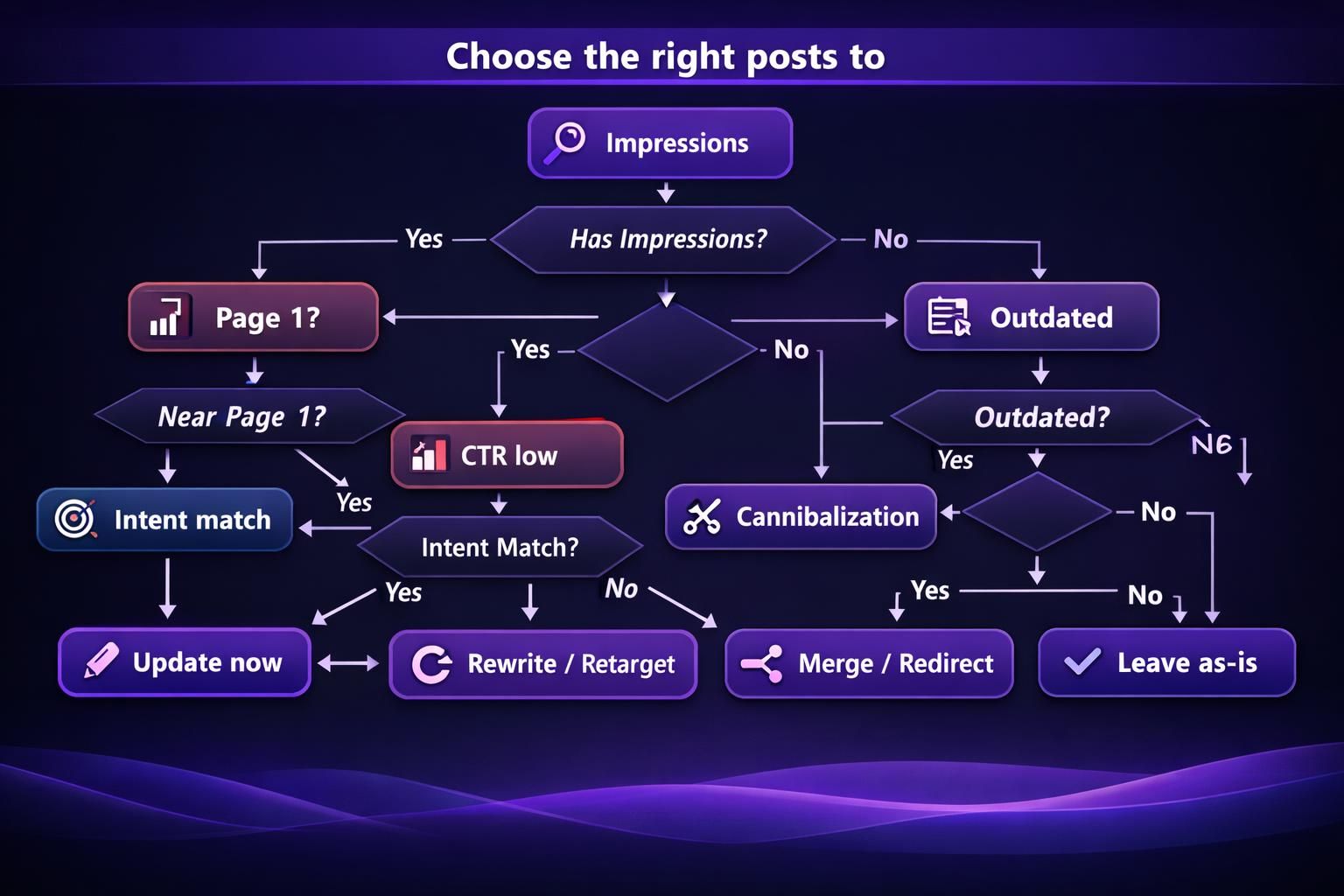
Start with an inventory of indexable URLs, their topic, and their role. Then run a quick audit for decay, intent mismatch, and easy on-page wins. Prioritize pages with high impressions but low CTR, rankings around positions 5 to 20, evergreen content with outdated sections, posts that support money pages via internal links, and URLs with strong backlinks but slipping traffic.
If a “topic clusters” post stopped converting and ignores internal linking workflows now common in the SERP, it’s a strong refresh candidate. Keep the URL slug stable during selection.
What to Pull From Google Search Console and Analytics
Google Search Console should drive your refresh plan because it shows real queries, impressions, CTR, and average position. Google Analytics helps you understand engagement and outcomes on the page.
Pull these from Search Console:
- Top queries and top pages report for the last 3 to 6 months
- Queries with high impressions and low CTR
- Queries where you rank 8 to 20
- Pages with declining clicks over time
Pull these from Analytics:
- Organic traffic trends for the page
- Entrances and exit rates for the post
- Scroll or engagement signals if you track them
- Conversions tied to the post, even if assisted
Example: Search Console may show you rank for “refresh old content seo,” but the post barely covers a process. Fix the mismatch fast. For a clean workflow, see connecting Search Console data.
Re-align the Post to Current Search Intent and Keywords
Re-aligning works when you match what searchers want today on the same core topic and URL. You’re not changing keywords. You’re tightening the page’s promise and delivering on it.
Confirm search intent by scanning the SERP. Is it mostly guides, lists, templates, or product pages? Choose one primary keyword with a clear page goal, then use 2 to 4 supporting terms as reinforcing language, not separate intents.
Re-check top results for repeated angles, update the intro to address the user’s problem fast, and add missing sub-answers competitors cover. If “content consolidation” results focus on “merge posts and redirect,” strengthen guidance on 301 redirects and canonical tags. Updating old posts helps SEO by improving relevance and CTR for the same queries.
Refresh the Outline Using Competitor Gaps + PAA Questions
A refreshed outline should mirror the questions people actually ask, not your original draft’s structure. Competitor analysis makes this easier because it shows what Google rewards right now.
Use this outline method:
- Scan top-ranking pages and list repeated subtopics
- Note any unique sections that look genuinely helpful
- Pull People Also Ask questions and cluster them by theme
- Add 2 to 4 new sections that fill obvious gaps
- Remove sections that don’t support the intent anymore
For example, if People Also Ask includes “Should I change the publish date?” add a short, direct answer section. If competitors all include a checklist, add one that’s specific to your workflow. If you want help building FAQs quickly, generate FAQs in-editor can speed up the drafting step.
Keep it tight, though. Adding sections is good. Adding fluff isn’t.

Update On-page SEO Elements (Without Breaking Rankings)
On-page SEO updates work best when you change the minimum needed to increase clarity and CTR. You don’t want to rewrite the whole page if it already ranks. You want to strengthen signals while keeping the topic stable.
The safest order is:
- Title tag and meta description first
- H1 and header tags (H2/H3) second
- On-page keyword placement and entity coverage third
- Image alt text and media cleanup last
For example, if you rank position 4 but CTR is weak, don’t overhaul the URL and headings immediately. Start with the snippet. A better title tag can lift clicks without touching the body copy.
Now, when you do touch the body, keep key sections that earn rankings. Rewrite around them. And keep internal links intact unless they’re wrong or broken.
Title Tag & Meta Description for Higher CTR
Your title tag and meta description should match the SERP’s dominant phrasing and set clear expectations. If you rank but don’t get clicks, the snippet is often the issue.
Strong title tags put the main task upfront, add an intent qualifier like “step-by-step,” and stay readable while avoiding vague promises. Meta descriptions should restate the problem and audience, preview 2 to 3 concrete sections, and match what’s on the page.
Example: “Blog Post Update Tips” is too broad. Try “Update Old Blog Posts for SEO: Audit, Refresh, Republish.” For draft options, generate meta titles faster can help, but review every version for intent fit.
Headings, FAQs, and Basic Schema Opportunities
Your headings should make the page skimmable and make your promises obvious. That means clean H2s, specific H3s, and fewer clever titles.
A practical headings pass includes:
- Ensure one clear H1 that matches the primary keyword
- Reorder H2s to match a step-by-step flow
- Turn vague H2s into action-based phrases
- Add an FAQ section where it fits naturally
Schema markup can help with structured data clarity, especially for FAQs and how-to patterns. But keep it realistic. If your content isn’t a real FAQ section, don’t force FAQ schema.
For example, if you add three People Also Ask questions as H3s with short answers, that’s a natural FAQ section. You can then consider basic FAQ schema. If your site setup supports it, generate schema markup can speed up implementation.
Improve Content Quality, UX, and Trust Signals
Quality upgrades matter because readers and Google notice stale, confusing pages. You’re not just updating facts. You’re improving clarity, scanability, and confidence.
Tighten the first screen so the intro states the problem and the approach fast. Then format for scanners with short steps, checklists, and clear section summaries. Improve UX by fixing layout issues, slow embeds, and mobile friction.
Add trust signals: current references, clear assumptions and limits, specific examples, updated screenshots, and working links. If you recommend a feature that no longer exists, that’s a trust leak that can raise bounces. Structured answers also improve AI readability, making the page easier for LLMs and humans to extract and follow.
Update Stats, Examples, Screenshots, and Outbound Links
Update any stats, screenshots, and examples that could make a reader doubt the rest of the page. One outdated data point can make the whole post feel unreliable.
Use this checklist:
- Replace old statistics/data points with current sources you trust
- Swap screenshots to match the current UI
- Update step-by-step instructions to match today’s tools
- Review external links for relevance and broken links
If you mention a Google Analytics view that no longer matches the dashboard, rewrite the steps and add a new screenshot. If an outbound link now redirects to a sales page, replace it with a stable reference.
Don’t ignore images. If filenames are messy or alt text is missing, fix it during the refresh. For practical guidance, where to add alt text is a helpful reference.
Add Internal Links and Remove/repair Broken Links
Internal links help refreshed posts by connecting them to your site structure, preventing orphaned pages, and clarifying topic clusters.
Do a focused pass: add links to newer supporting posts where they genuinely help, link to foundational process pages, remove links to retired URLs or redirect them properly, and fix broken links. Update anchors when the target or context changed.
Example: when updating a post on content audit steps, add a link to your topic cluster guide near the clustering section, not in a pile at the end. For a systematic check, scan internal link health can help you find breakages faster. Keep anchors natural and avoid overusing exact-match phrases.
Republishing Decisions and Technical Considerations
Republishing decisions matter because they affect indexing, user expectations, and link equity. You’re balancing freshness signals with stability. Most of the time, the best move is to keep the same URL and improve the content in place.
Technical checks you should do during a refresh:
- Confirm the page is indexable and not blocked by robots.txt
- Verify canonical tag points to itself, unless there’s a reason
- Keep the URL slug stable unless it’s truly wrong
- Check for accidental noindex tags from plugins or templates
- Make sure structured data still validates after edits
For example, if your refreshed post doesn’t appear in Search Console, check indexing settings. It might be blocked by a template change. That’s when you stop editing content and fix the technical issue first.
If you’re consolidating content, plan it like a mini migration. That means redirects, canonicals, and updated internal links.
Whether to Change the Publish Date vs Add “Last Updated”
You should change the publish date only when the update is substantial and the date is part of the user’s decision. Otherwise, a “Last updated” note is clearer and less disruptive.
A practical rule:
- Use “Last updated” for ongoing evergreen content maintenance
- Change publish date when the post is effectively a new edition
- Avoid fake freshness. Readers notice.
For example, a “SEO checklist” that you rewrite and restructure might deserve a new publish date. A post where you only fix screenshots and add two FAQs probably doesn’t. You can add “Last updated” near the top, then include what changed in a short note.
After republishing, reshare it where it originally performed. That could be a newsletter segment or a social post. Just keep messaging honest.
When to Merge, Redirect, or Retire the Post
You should merge or retire posts when overlap causes cannibalization or when the topic no longer fits your site. Keeping two similar posts often splits rankings/positions and confuses internal links.
Use these decisions cues:
- Merge when two posts target the same intent and both are mid-performing
- Redirect with a 301 redirect when one URL clearly becomes the winner
- Retire when the topic is obsolete and there’s no relevant replacement
- Use a canonical tag only when you have a strong reason to keep duplicates
For example, you might have “content audit process” and “content inventory process” posts that overlap heavily. If one has backlinks and the other has better structure, merge into the stronger URL. Then 301 redirect the weaker one. Update internal links that pointed to the old page.
If you’re unsure, don’t guess. Consolidation mistakes can cost traffic for months.
Conclusion
A good refresh is deliberate, not a full rewrite spree. Pick posts with clear opportunity, confirm search intent, and update the parts that influence clicks and trust. Then tighten on-page elements and improve internal linking so the page fits your site structure today.
Your next step is simple. Choose one decaying evergreen post and run the audit workflow. Track changes in Search Console for queries, CTR, and position shifts. That’s the cleanest way to learn what moves the needle on your site. And if you’re building a repeatable process, it’s worth documenting how to update old blog posts for seo so each refresh gets faster.